⭐️ Love Smoke Monkey Harness? Star the repository on GitHub! Star on GitHub ⭐ • 🌐 Test in Live Browser Simulator: smoke-monkey-harness.vercel.app ↗
🐒 Smoke Monkey Harness v0.1.3
⚡ Zero Runtime Dependencies • Multi-Provider • MCP Ready

Smoke Monkey Harness

An embeddable, framework-agnostic TypeScript runtime for building autonomous looping AI agents, code editors, and developer tools with deterministic phase execution and human-in-the-loop safety.

pnpm add @smoke-monkey/harness
6 Phases
Deterministic State Machine
18 Providers
Direct Cloud & Local LLMs
24 Tools
Filesystem, Shell, Git & MCP
0 Deps
Pure Vanilla TypeScript Core

01. Architecture & The 3 Pillars

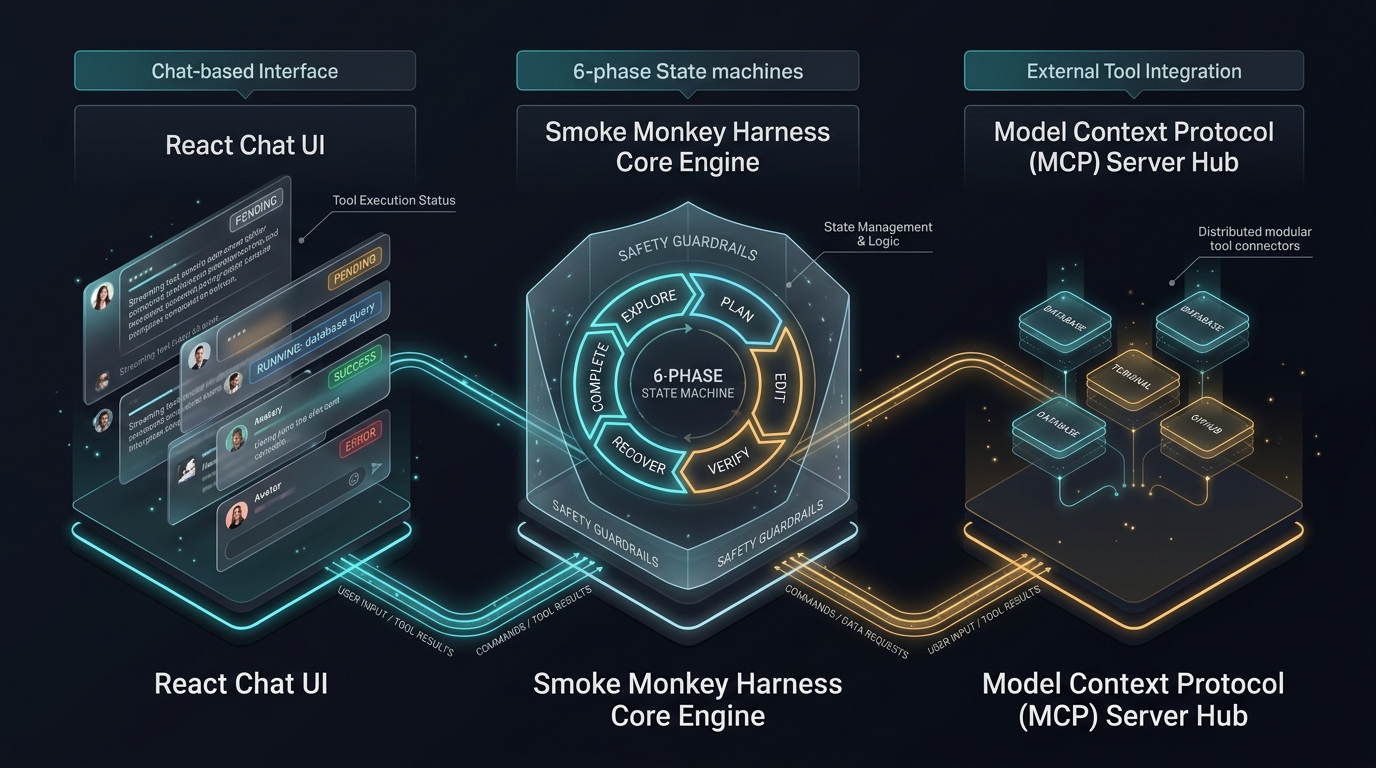
Unlike monolithic frameworks that bundle bloated abstractions and opaque prompts, Smoke Monkey separates the autonomous execution loop, the human-in-the-loop permission model, and the frontend presentation layer into three modular packages:

Smoke Monkey 3-Pillar Architecture Diagram
The Three Pillars of Smoke Monkey: UI Presentation, Autonomous Harness, and MCP Extensibility
Pillar Package Role & Capabilities
1. Frontend UI @smoke-monkey/ui Drop-in React chat interface, streaming markdown, collapsible tool execution cards, 14 theme presets, and zero-backend synthetic simulation.
2. Backend Engine @smoke-monkey/harness Zero-dependency TypeScript agent loop, 6-phase state machine, runaway step guards, context compaction, and modular sub-context memory.
3. Extensibility @smoke-monkey/mcp 22 built-in MCP development tools, stdio & HTTP SSE connectors, scaffolding engine, and IDE plugin bundles (Claude Code, Cursor, Copilot).

02. Quickstart & First Agent

Create an autonomous coding agent with full file access, self-healing reflection, and terminal execution in under 20 lines of TypeScript:

agent.ts
import { createAgent } from '@smoke-monkey/harness';

// Initialize the agent with your choice of provider
const agent = createAgent({
  provider: 'nvidia', // 'openai' | 'anthropic' | 'groq' | 'deepseek' | 'ollama' | ...
  model: 'nvidia/nemotron-3-super-120b-a12b',
  workspacePath: process.cwd(),
  autoApprove: true, // auto-approve read and mutation tools for non-interactive runs
});

// Stream real-time tokens and tool events
agent.on('text.delta', (e) => process.stdout.write(e.data.delta));
agent.on('tool.started', (e) => console.log('\n⚙️ Running tool:', e.data.toolName));
agent.on('phase.changed', (e) => console.log(`\n🔄 Phase: ${e.data.from} ➔ ${e.data.to}`));

// Execute task
const result = await agent.run('Inspect this repository, locate package.json, and explain its scripts');
console.log('\n✅ Task finished with status:', result.status);

03. The 6-Phase Agent Loop & Self-Healing

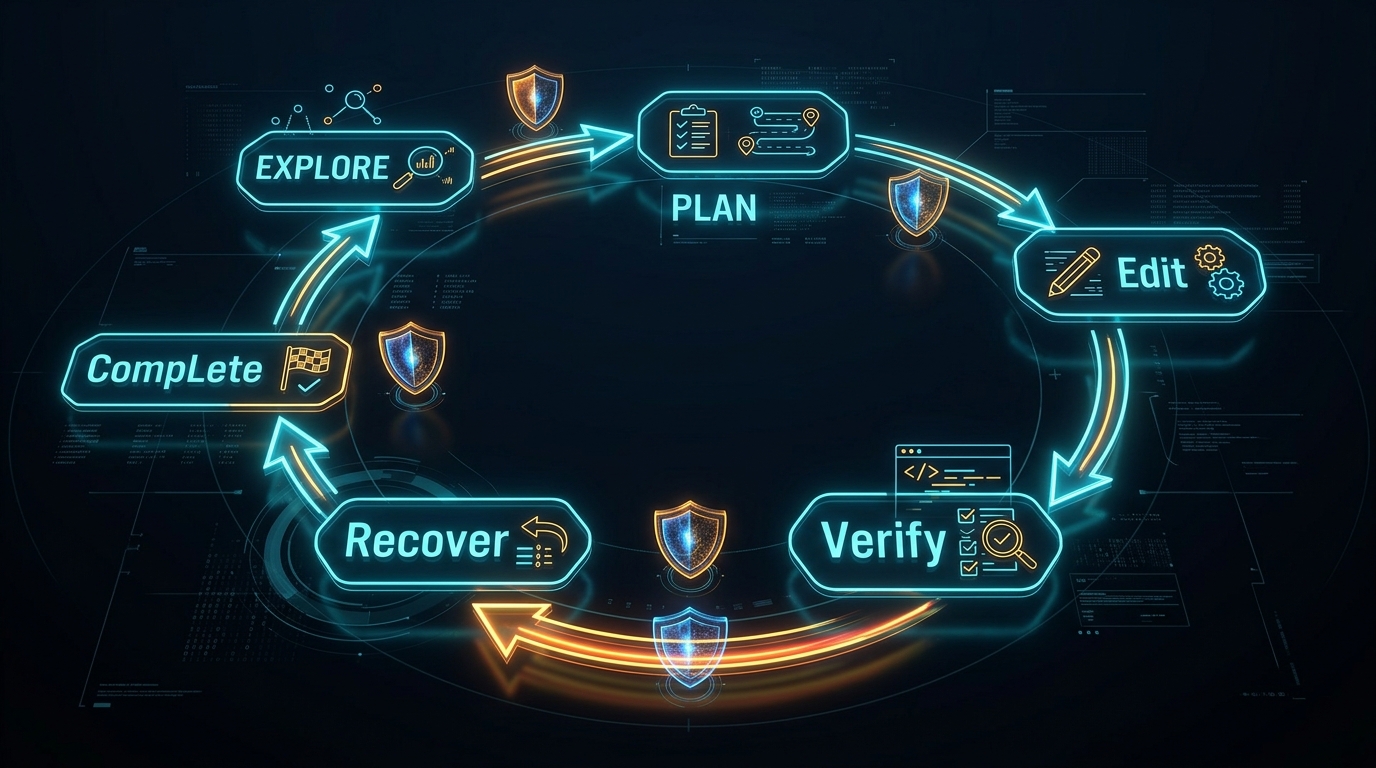
Unconstrained AI agents often suffer from infinite loops, goal drift, and hallucinated successes. Smoke Monkey bounds agent execution inside a deterministic state machine:

Smoke Monkey 6-Phase Execution Loop
Deterministic 6-Phase State Machine: explore ➔ plan ➔ edit ➔ verify ➔ recover ➔ complete
Phase Description Permitted Tools Transition Criteria
explore Surveying repository layout, reading source files, searching symbols. read_file, glob, grep, git_status Transitions to plan once requirements are mapped.
plan Formulating execution strategy and subtask breakdown. todo_write, context_manage Transitions to edit when roadmap is registered.
edit Writing code, modifying files, applying line-range replacements. write_file, edit_file, apply_patch Transitions to verify after code changes.
verify Running compilers, linters, and automated test suites. run_command, run_tests Passes to complete if clean; auto-demotes to recover if tests fail.
recover Self-healing: analyzing error stacks and synthesizing corrective patches. read_file, git_diff Transitions back to edit to apply fixes.
complete Final verification, summary synthesis, and returning RunResult. Read-only Loop terminates and returns RunResult to caller.

04. Tool Registry & Custom Tool Implementation

Smoke Monkey ships with 24 built-in tools organized into five standard groups: filesystem, terminal, search, git, and agent.

Creating Custom Tools

Define custom tools using standard TypeScript definitions and pass them into createAgent:

custom-tool.ts
import { ToolDefinition } from '@smoke-monkey/harness';

export const deployPreviewTool: ToolDefinition = {
  name: 'deploy_preview',
  description: 'Deploys a staging preview environment to cloud infrastructure',
  parameters: {
    type: 'object',
    properties: {
      branch: { type: 'string', description: 'Git branch to deploy' },
      env: { type: 'string', enum: ['staging', 'preview'], default: 'preview' }
    },
    required: ['branch']
  },
  async execute({ branch, env }) {
    // Your deployment logic here
    return { success: true, url: `https://${branch}.preview.example.com` };
  }
};

05. Permissions & The Three Interactive Pauses

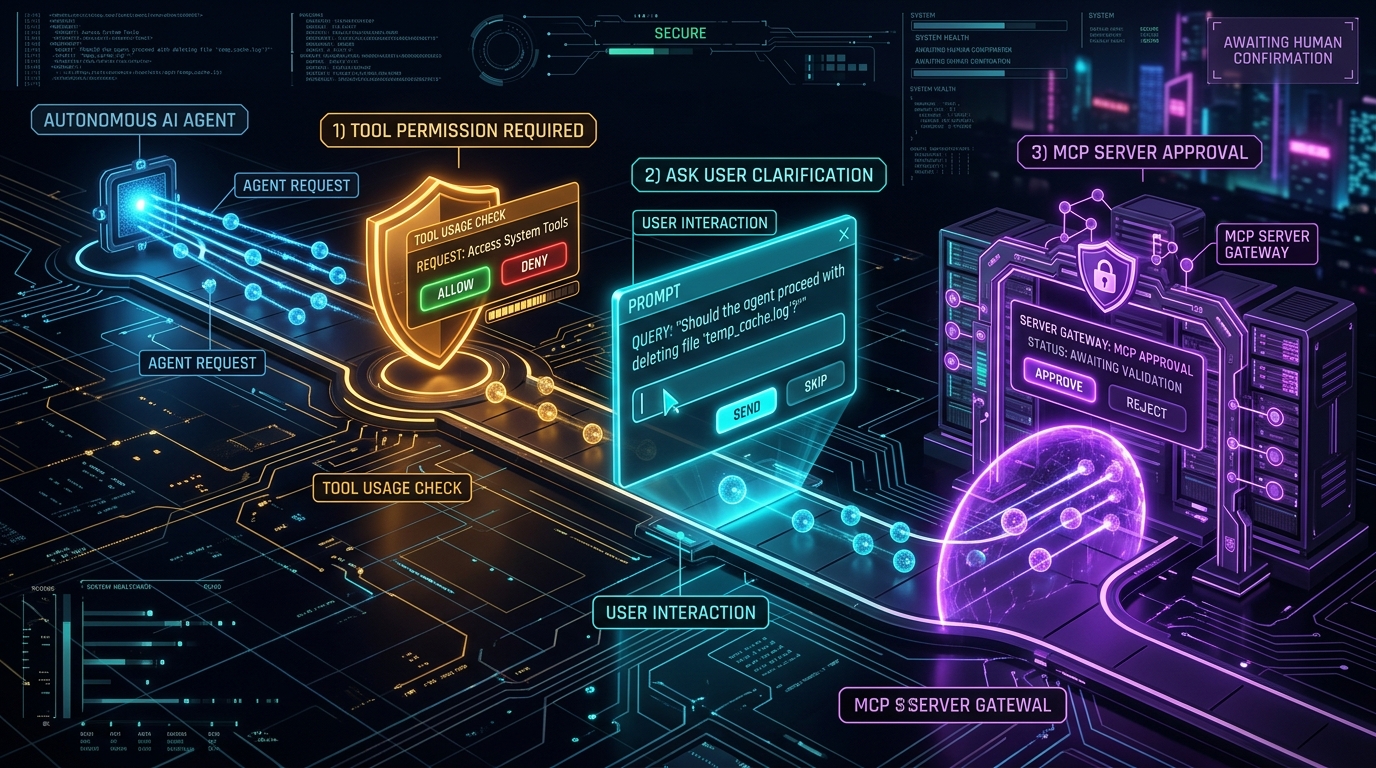
Destructive operations like modifying production files or executing shell commands are gated by safe Human-in-the-Loop suspension points:

Smoke Monkey Interactive Pauses
The Three Interactive Pauses: permission.required, ask_user.required, and mcp.approval_required
Event Trigger Condition Resolution API
permission.required Mutating tool (file edit, terminal command) requests execution. agent.resolvePermission(toolCallId, 'allow' | 'deny')
ask_user.required Agent needs human input or clarification on ambiguous intent. agent.respond(toolCallId, answerString)
mcp.approval_required External MCP server requires authorization before connection. agent.resolveMcpDecision(toolCallId, { action, names })

06. Model Context Protocol (MCP) Integration

Connect any external database, API, or developer service via the open Model Context Protocol using either stdio subprocesses or streamable-HTTP (SSE):

mcp-config.ts
const agent = createAgent({
  workspacePath: process.cwd(),
  mcp: [
    // Local stdio MCP server
    {
      id: 'sqlite',
      command: 'npx',
      args: ['-y', '@modelcontextprotocol/server-sqlite', '--db-path', './dev.db']
    },
    // Remote HTTP SSE MCP server
    {
      id: 'analytics',
      url: 'https://mcp.internal.company.com/sse',
      headers: { Authorization: `Bearer ${process.env.MCP_TOKEN}` }
    }
  ]
});

07. Just-in-Time Skills (SKILL.md Discovery)

Instead of overloading the system prompt with dozens of long workflow instructions, Smoke Monkey implements a Two-Tier JIT Injection Pattern providing 94% token savings:

  • Tier 1 (Index Catalog): The model sees only skill names and a 1-line summary (~150 tokens total).
  • Tier 2 (On-Demand Activation): When a skill is needed, the model calls use_skill and only the relevant instruction file is injected into the active turn.

08. Sub-Contexts & Modular Memory

Break down monolithic system prompts into modular blocks (e.g. code-review, security-audit, database-expert) that can be activated dynamically at runtime using context_manage without resetting the session memory.

09. Lifecycle Hooks & Error Hierarchy

Intercept model turns and tool executions with fail-closed security policies, PII redaction, and deterministic error handling:
hooks.ts
const agent = createAgent({
  workspacePath: process.cwd(),
  hooks: {
    async beforeToolCall(toolCall) {
      if (toolCall.name === 'run_command' && toolCall.input.command.includes('rm -rf /')) {
        throw new Error('Blocked unsafe destructive command!');
      }
    },
    async beforeModelCall({ messages }) {
      // Redact sensitive credentials or inject telemetry
    }
  }
});

10. Drop-In React Chat UI (@smoke-monkey/ui)

Mount a complete, enterprise-grade AI chat interface in any React, Next.js, or Vite application in seconds:

App.tsx
import React from 'react';
import { SmokeMonkeyChat, WebSocketTransport } from '@smoke-monkey/ui';
import '@smoke-monkey/ui/ui.css';

const transport = new WebSocketTransport({ url: 'ws://localhost:4000/agent' });

export default function App() {
  return (
    
⚡ }} />
); }

API Reference — createAgent({ … })

Complete configuration parameters for createAgent:

Property Type Description
provider string LLM vendor ('nvidia', 'openai', 'anthropic', 'deepseek', 'groq', 'together', 'ollama', etc.).
model string Model identifier (e.g. 'nvidia/nemotron-3-super-120b-a12b', 'gpt-4o', 'claude-3-7-sonnet').
workspacePath string (required) Absolute path to the workspace root directory where tools execute.
autoApprove boolean If true, automatically approves tool mutations without pausing for human permission.
mcp McpServerConfig[] Array of external Model Context Protocol server configurations (stdio or HTTP SSE).
skillsDir string | string[] Custom directories containing SKILL.md manuals for just-in-time injection.
hooks AgentHooks Lifecycle intercepts (beforeModelCall, beforeToolCall, etc.).

Supported LLM Providers (18 Direct Cloud & Local)

Smoke Monkey talks directly to vendor endpoints with native streaming and per-provider environment key resolution:

  • Cloud Providers: NVIDIA NIM, OpenAI, Anthropic, OpenRouter, xAI (Grok), Google Gemini, DeepSeek, Qwen (DashScope), Hugging Face, Mistral AI, Cohere, Groq, Together AI, Fireworks AI, Cerebras, Z.ai (GLM), Moonshot (Kimi), OpenCode Zen.
  • Local Inference: Ollama (zero API key needed).

Contributing & Community

Smoke Monkey Harness is an open-source project released under the MIT License. Contributions, issue reports, and pull requests are welcome on GitHub!

Explore the GitHub Repository ↗